

Introducing Split Tunneling: The Newest Feature in VPN.lat for Android
We are excited to announce a major upgrade to VPN.lat for Android! With our brand-new Split Tunneling feature, you now have full control over how individual mobile applications connect to the internet.
Have you ever needed to keep your phone protected behind an encrypted VPN connection, but had to turn it off because your local banking or food delivery app stopped working? You no longer have to constantly disconnect and reconnect your VPN. The new Split Tunneling update lets you exclude specific apps from the VPN tunnel while keeping the rest of your traffic 100% encrypted and secure.
What is the New Split Tunneling Feature and How Does It Work?
By default, connecting to a VPN routes all your Android phone’s network traffic through an encrypted tunnel. While this delivers maximum privacy, certain everyday applications require your true local IP address to function correctly:
- Banking & Financial Apps: Local banks often lock accounts or trigger extra security verification when detecting access from remote IP addresses.
- Delivery & Ride-Hailing Services: Apps such as Uber, DoorDash, or Rappi rely on your precise local position to process orders and show correct regional menus.
- Local Streaming & Gaming: Routing local mobile games or regional video streams through an overseas server can cause unwanted ping and slower speeds.
VPN.lat’s new Split Tunneling feature solves this completely. It divides your network traffic into two distinct streams: selected apps connect directly through your local internet service provider (ISP), while all other apps stay safely secured inside the VPN.lat tunnel.
How to Set Up the New Split Tunneling Feature (Step-by-Step)
Configuring this new capability on your Android device takes less than a minute:
- Update & Open VPN.lat: Ensure you have installed the latest update from the Google Play Store, then launch VPN.lat.
- Open Settings: Tap the Settings (arrow icon) in the top menu bar.
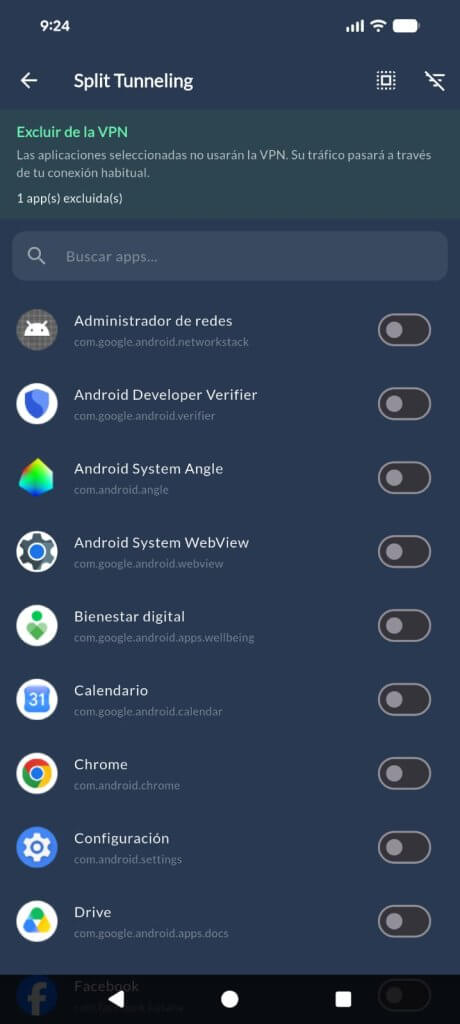
- Choose Apps to Exclude: Scroll through your installed applications and check the box next to any app you want to bypass the VPN.
- Connect & Enjoy: Return to the main screen and connect to your preferred server. The excluded apps will run on your standard network, while everything else remains fully encrypted!
Try the New Split Tunneling Feature Today!
The new Split Tunneling feature is now live and available for all Android users on VPN.lat—100% free! Head over to the Google Play Store to update your app and experience full customization over your mobile internet connection.
New to VPN.lat? Enjoy fast, free VPN servers across 80+ countries, unlimited bandwidth, WireGuard and OpenVPN protocols, and strict zero-logs privacy.
Learn More